Changelog
Stay up to date with the latest updates and improvements to Business Aql.
Business Aql v0.0.16 - Try Business Aql With No Login, Long-Term Memory, Token Tracking & AI File Sorting
What's New in v0.0.16
If you've ever wanted to try an online ChatGPT alternative or a free AI chatbot like ChatGPT without creating an account, v0.0.16 is for you. This release makes Business Aql instantly accessible with a no-login online experience, adds durable long-term memory for users and teams, brings full token-usage visibility to every chat, introduces AI file sorting, and ships a brand-new knowledge base export feature. It turns Business Aql into an even more practical free alternative to ChatGPT for real knowledge work.
No-Login Online Experience
- ChatGPT Online, No Login Required: Try Business Aql online for free without signing up. First-time visitors can chat and test the free ChatGPT alternative experience instantly, with free tokens included.
- Anonymous-Friendly: Sign-in is now optional on the public experience, while your authenticated data stays fully protected.
- Cleaner Behind the Scenes: Removed leftover artifacts from the older sync system for a smoother experience.
Long-Term Memory for Users & Teams
Business Aql agents now actually remember.
- Personal & Team Memory: Business Aql can now remember durable information about you and your team across chats, stored cleanly as markdown you can read and edit yourself.
- Natural Greetings: Memory now includes your display name and first-name context, so replies feel more personal.
- One Simple Memory Tool: A single, unified "update memory" action handles personal and shared memory, with sensible size limits.
- Runs in the Background: Memory extraction happens in the background, so it never slows down your chat.
- Smart Team Memory Policy: Team memory only captures durable, relevant context and ignores noise, so shared memory stays useful.
- Memory Management UI: A clean screen for viewing, pinning, and editing personal and team memory, with helpful empty states and limit warnings.
- Export Memory as Markdown: Download your personal or team memory as a markdown file with one click.
- Clean Migration: Old memory storage has been fully migrated to the new format.
Token Usage Tracking Across Chat
Token visibility is now first-class.
- Usage Per Call: Business Aql now tracks how many tokens every AI call uses.
- Complete Coverage: Token usage is captured for both streaming and non-streaming AI responses.
- Inline in Chat: See token usage for any message via a simple info dropdown on the message itself.
- Better Response Handling: Cleaner response behavior and chat title generation built around token tracking.
Reworked Model Selector
- Redesigned Model Picker: A cleaner UI with a new GitHub Models icon and per-agent model management for power users.
- OpenRouter Integration: Hundreds of models (including free Claude-compatible routes) are now available through a single OpenRouter configuration.
- Clearer Model Display: Message info now shows which model was used for every reply, with simpler settings and improved icons.
AI File Sorting
- AI Sort Button: A new AI-powered sort in the documents table. Let the AI rank and group your documents semantically. It's a real quality-of-life win for anyone with a large knowledge base.
Knowledge Base Export
- Export Your Knowledge Base as ZIP: One click downloads your entire knowledge base as a ZIP with your folder structure preserved.
- Folder-Level Export: Right-click any folder to export just that folder.
- Processing Warning: Business Aql warns you if documents are still processing, so you never ship an incomplete archive.
- Prominent Export Buttons: Export is easy to find in both the documents toolbar and the sidebar, with a loading spinner during large exports.
Trusted MCP Tools
- Trust Sensitive Tools Once: Mark specific MCP tools as trusted and skip repeated approval prompts for actions you've already decided are safe.
- Cleanup on Delete: Removing an MCP connector now correctly clears related caches, so stale entries never hang around.
Document Upload & Processing Modes
- Pick Your Processing Mode: Document uploads now let you choose how each file is parsed, with clearer error messages if something goes wrong.
- LlamaCloud v2: Upgraded to the new LlamaCloud integration.
- Smarter Image Handling: Uploaded images now automatically go through a vision model, with a document-parser fallback and clearer behavior when vision models aren't configured.
Code Execution Sandbox
- Cleaner Code Tool: The built-in "execute code" tool is simpler and more reliable, with helpful hints when your code produces no output.
- Run in Parallel, Download Files: The sandbox now supports multi-threaded execution and lets you download files produced by your code back into chat.
- No More Orphans: Broken sandboxes are cleaned up before a replacement is created, so nothing piles up in the background.
- Hardened Security: Tighter security settings, safer file syncing, and a fix for potential path traversal issues.
Unified Approvals
- One Approval Flow Everywhere: Approvals across Confluence, Dropbox, Gmail, Google Calendar, Google Drive, Jira, Linear, Notion, and OneDrive are now consistent, with a shared approval UI.
- Smarter Deduplication: Duplicate approval requests are filtered out, so you're never prompted twice for the same action.
Connectors & Desktop
- Obsidian Connector Visibility: The Obsidian connector is now easier to discover and set up on desktop.
- Cross-OS Download Buttons: The sidebar profile and a new download button automatically show the right desktop installer for your OS, in your language.
Marketing & SEO
- New Blog Section: Added a dedicated blog section to the marketing site for deeper guides on ChatGPT alternatives, Claude alternatives, and NotebookLM alternatives.
- Improved SEO Metadata: Updated metadata across key pages to emphasize privacy, data limits, and open source positioning.
- Pricing FAQ: New FAQ section in pricing with dynamic questions.
- Pricing Clarity: Updated pricing to clearly show the 500 pages included in the free plan.
UI Polish
- Safer Error Recovery: A dedicated error boundary around the dashboard prevents isolated errors from crashing the full page.
- Animated Report Skeleton: A new animated loading state in the Report Panel while reports are being generated.
- Composer & Layout: Loading placeholders in the composer, a better mention picker experience, and refined settings layout.
- Better Editing: Trailing empty lines in the rich-text editor make long-form writing smoother.
v0.0.16 makes Business Aql the easiest open source AI assistant to actually try: zero friction, no login, online. Whether you're searching for a ChatGPT alternative free online, a free Claude AI alternative, or a NotebookLM alternative you can self-host, Business Aql v0.0.16 is built for you.
Business Aql connects all your knowledge sources in one place.
Business Aql v0.0.15 - Watch Local Folders, Vision Autocomplete & New Document Pipeline
What's New in v0.0.15
This release continues to push Business Aql as a fully self-hostable, open source ChatGPT alternative and NotebookLM alternative for teams who care about where their data lives. v0.0.15 is all about bringing your local files into the knowledge base effortlessly and making the Business Aql desktop app a first-class always-on assistant.
Watch Local Folder
Your files already live in folders. Now Business Aql can watch them.
- Real-Time Folder Sync: Pick any folder on your computer, and Business Aql automatically keeps it indexed as files are added, edited, or removed.
- Nothing Gets Lost: Even across restarts or network blips, pending file changes are safely queued until they're fully processed.
- Smart Batching: Many files at once? Business Aql now processes them in smart batches with progress feedback, so large folders stay responsive.
- Clean Folder Cleanup: Deleted or emptied folders are cleaned up automatically in the background.
- Fast First Sync: Existing folders seed their file timestamps in a single pass, so the first sync is both fast and correct.
- Upload-Based Sync Too: Don't want the desktop watcher? Upload a folder from the web app and your folder structure is preserved automatically.
- Local Files as First-Class Documents: Locally-watched files show up clearly in the documents list as their own category.
Document Version History
- Full Version History: Every document now keeps a versioned history. View, compare, and restore older versions directly from the documents UI.
- Restore + Reindex: Restoring an old version automatically triggers reindexing so search and chat results stay accurate.
- Built-In: Versioning is automatic. You don't have to configure anything.
New Document Processing Pipeline
We've rebuilt how Business Aql turns raw files into searchable knowledge.
- Pluggable Parsers: Choose the best extractor for each document with built-in support for Docling, LlamaCloud, Unstructured, and plain text. Configure it globally or per connector.
- Azure Document Intelligence: Added as a premium parsing option for high-accuracy PDF and scanned document parsing, available per upload.
- Audio Transcription: Upload audio files and Business Aql will transcribe them for you.
- Fast Path for Common Files: CSV, TSV, HTML, and XHTML files now skip heavier parsing and convert directly, cutting indexing time.
- Smart Routing: Each file is automatically routed to the parser best suited for it.
- Vision Model Is Opt-In: Vision models are now opt-in per upload/connector, with safer size limits and better fallbacks when an image can't be processed.
Vision-Powered Quick Assist (Desktop App)
The Business Aql desktop app becomes a serious always-on AI like ChatGPT that actually sees your screen, without leaving your current window.
- Screenshot-Based Autocomplete: Press a shortcut and Business Aql captures a screenshot, sends it to a vision model, and returns context-aware suggestions right where you're typing.
- Multi-Suggestion UI: The suggestion popup now offers up to 3 options to pick from, with clean cards and quick-assist detection.
- Knowledge Base Grounding: Suggestions are grounded in your connected knowledge base, not just generic model output.
- macOS Permission Onboarding: A clearer onboarding page walks macOS users through the permissions the app needs, only when they're actually needed.
- Switch Search Spaces from the Overlay: Change the active search space without opening the main app.
- General Assist: A new general-purpose assist mode with cleaner shortcut icons and descriptions.
- Stay Signed In Everywhere: Sign-in is now synchronized between the desktop app and the web app.
- Vision Model Settings: A dedicated Vision Models tab in Settings lets you pick and manage vision models, including a dynamic model list from OpenRouter.
- Smart Download Button: The marketing site auto-detects your OS and offers the right desktop installer.
Connectors
- Dropbox Delta Sync: A smarter incremental sync for Dropbox that preserves your place across re-authentication. Big Dropbox workspaces sync dramatically faster.
- Stronger Google OAuth: Native Google sign-in now uses modern, best-practice security (PKCE).
Page Limits & Quotas
- Per-User Page Limits: Business Aql now estimates and enforces per-user page limits before indexing begins, so usage stays predictable on cloud and self-hosted deployments.
- Consistent Across the App: Local folder indexing respects the same page-limit checks as cloud connectors.
Document Upload
- Unified Picker: Upload files and folders from one clean dropdown, with clearer size limits and properly localized messages.
- Better Processing Feedback: Improved upload progress and processing indicators, plus a cleaner drag-and-drop area.
Performance
- Faster Startup: Analytics and some dev tooling only load when needed, keeping the app lighter for end users.
- Leaner Pages: Shared libraries now load smaller, more focused bundles.
- Smoother Self-Hosted Setup: New installs of the real-time sync service now set themselves up automatically.
If you've been looking for a tool that works across your cloud connectors and your local machine, v0.0.15 is exactly that. It's also one of the most compelling NotebookLM alternatives and free ChatGPT alternatives for private team use, with full control over your data, your parsers, and your models.
Business Aql connects all your knowledge sources in one place.
Business Aql v0.0.14 - Dropbox, OneDrive, Agent Approvals, Reports & Self-Hosted Docker
What's New in v0.0.14
This release pushes Business Aql further as an open source, privacy-first, self-hostable knowledge platform and a serious ChatGPT alternative for teams. It ships two major connectors (Dropbox and Microsoft OneDrive), a new approval system for sensitive AI actions, a full report generation and export pipeline, a brand new desktop app, a one-command self-hosted installer, and a faster real-time sync backbone.
New Connectors
Dropbox Integration
- Full Dropbox Connector: Connect Dropbox in one click, then pick exactly which folders and files Business Aql should index.
- Incremental Sync: Only re-index what actually changed, so syncs stay fast and cheap even on huge Dropbox workspaces.
- Dropbox Paper Support: Dropbox Paper docs are now exported as clean, readable text so AI answers stay accurate.
- Write Actions in Chat: Ask Business Aql to create or delete Dropbox files directly from chat, with a confirmation step before anything is changed.
- New Docs: Dropbox connector documentation added to the site.
Microsoft OneDrive Integration
- OneDrive Connector: A native Microsoft OneDrive connector with secure sign-in and a built-in file picker.
- Folder Management UI: Browse and select OneDrive folders visually, with proper handling of different file types.
- Create & Delete Files from Chat: AI agents can create and delete OneDrive files for you. Newly created documents are auto-converted to Word format when appropriate, and expired sign-ins are handled gracefully.
- Instant Knowledge Base Sync: Any OneDrive file created through Business Aql is synced into your knowledge base right away, so it's immediately searchable.
- New Docs: OneDrive connector documentation added to the site.
Human-in-the-Loop Approvals
Business Aql now treats every sensitive AI action as an explicit, reviewable step. This is the right default when you're letting an AI agent send emails, create calendar events, or edit tickets on your behalf.
- Unified Approval Flow: One consistent approval experience across every connector, with built-in deduplication so you never get prompted twice for the same action.
- Rich Approval Card: Edit anything before approving, including dates, times, email recipients, and formatted content (for Confluence pages).
- Approvals Across Connectors: Gmail (drafts and updates), Google Calendar (events), Google Drive, Jira (issue creation with a direct link in the response), Confluence (page creation with a direct link), Linear (write actions), and Notion.
- Graceful Re-authentication: When a connector's sign-in expires, Business Aql now asks you to re-authenticate inline without breaking the conversation.
Reports & Multi-Format Export
- New Reports System: Generate versioned, editable Markdown reports from any chat. Edit them in a full rich-text editor with save, leave, and read-only viewing modes.
- Public Report Links: Share reports publicly with a clear indicator and one-click markdown download.
- Multi-Format Export: Export reports and documents to PDF, Word (DOCX), HTML, LaTeX, EPUB, OpenDocument (ODT), and plain text.
- Smarter Follow-Ups: Chat now remembers recent report context, so follow-up questions feel natural and stay grounded in what you were just working on.
- Math & Code Rendering: Markdown rendering now supports beautiful math equations and syntax-highlighted code out of the box.
Desktop App
- New Business Aql Desktop App: First release of the Business Aql desktop client.
- Quick Ask Panel: A floating mini-window opens at your cursor, doesn't steal focus from your current app, and can grab selected text and paste answers back for you.
- Global Shortcuts: Keyboard shortcuts that feel right on each OS, with press-Escape-to-hide and smart positioning that stays on-screen.
- Cross-Platform: A non-focus-stealing floating panel on macOS with a matching experience on Windows and Linux.
Faster Real-Time Sync
- Upgraded Sync Engine: Moved to a faster real-time sync engine behind the scenes, so the inbox, documents, comments, chats, and connector status all update instantly.
- Production-Ready: Self-hosted deployments get a dedicated sync service with Docker configuration and CI workflows included.
Self-Hosted Docker Installation
- One-Command Installer: New Docker configuration and install script for Linux and macOS, plus a Windows install script.
- Background Workers Included: Background indexing services are now part of the default Docker setup, so documents keep processing reliably without extra setup.
- Automated Releases: Each release now builds official multi-platform images, tagged cleanly for every version, and ready to use with auto-update tools.
- Easy Migration: An automatic migration script helps users move off the old all-in-one deployment.
- Stripe Config: Optional Stripe configuration added for paid self-hosted tiers.
Web Search & Knowledge Base
- Private Web Search (SearxNG): Built-in private web search so AI answers can reference the live web without sending queries to third-party search providers.
- Citations with Hover Previews: New citation cards with hover popovers on desktop and a dedicated drawer on mobile.
- Date-Filtered Knowledge Base Search: Narrow knowledge base searches by time range for more precise answers.
- YouTube Playlist Support: Index entire YouTube playlists, not just single videos.
- Faster Indexing: Documents now index significantly faster thanks to batched embedding under the hood.
Faster Connectors
- Parallel Indexing: Confluence, Jira, Linear, Notion, Gmail, Google Calendar, and Google Drive now index files in parallel, noticeably faster than before.
- Google Drive Upgrades: Parallel file downloads, native Excel parsing, streaming downloads, and the ability to index just the files you pick.
- Skipped File Tracking: Google connectors now clearly surface any files or messages that were skipped, so you always know what made it in.
UI & Mobile
- Mobile-First Polish: Mobile citation drawer, long-press actions in chats and documents, a responsive documents sidebar, and a mobile-friendly onboarding tour.
- Reworked Composer: Tool actions are grouped into a cleaner menu with better icons, plus a helpful "connect tools" banner.
- Settings & Team: New tabbed user settings page (profile + API keys), team roles management with pagination, and a search space settings dialog.
- Right Panel & Docked Sidebar: A tabbed Sources/Report panel with smooth transitions, plus an optional docked documents sidebar.
- Community Prompts: Public prompt library with copy support, inline share toggles, and a see-more/less toggle for long prompts.
- New Homepage: Smooth scrolling, a use-cases grid, an updated walkthrough hero, a GitHub stars badge, and a new carousel for AI-generated video.
- More Power: Bulk document deletion, folder creation and organization, document metadata viewer (Ctrl+Click), and document preview right inside the sidebar.
New LLM Provider
- MiniMax: Complete MiniMax LLM integration joins the growing list of supported models.
v0.0.14 is one of the largest Business Aql releases to date. If you're looking for a NotebookLM alternative or comparing free alternatives to ChatGPT that you can actually self-host, this release is built for you.
Business Aql connects all your knowledge sources in one place.
Business Aql v0.0.13 - Public Sharing, Image Generation & Redesigned Documents
What's New in v0.0.13
This update brings public sharing, image generation, a redesigned Documents page, and numerous bug fixes.
Features & Improvements
Image Generation
- Image Generation: Generate images directly in chat with custom model and provider configurations.
Public Sharing
- Public Chat Links: Share snapshots of chats via public links.
- Sharing Permissions: Search Space owners control who can create and manage public links.
- Link Management Page: View and revoke all public chat links from Search Space Settings.
Auto (Load Balanced) Mode
- Auto Model Selection: The default cloud model now automatically picks the lowest-load model for faster responses.
Redesigned Documents Page
- Unified Page: Merged Logs and Documents into one page with real-time statuses.
- Inline Connector Management: Configure and monitor connectors alongside your documents.
UI & UX Polish
- Inbox Refresh: Cleaner inbox layout for easier scanning.
- Streamlined Login: Consolidated loading screens into a single unified flow.
- Chat UI Tweaks: Small refinements for a cleaner, more consistent chat experience.
- Prompt Suggestions: Empty chat windows now show contextual suggestions.
Documentation
- New Connector Docs: Added docs for Luma, Circleback, Elasticsearch, Bookstack, and Obsidian connectors.
Business Aql is your AI-powered federated search solution, connecting all your knowledge sources in one place.
Business Aql v0.0.12 - New Main UI, Real-time Collaboration and Comments
What's New in v0.0.12
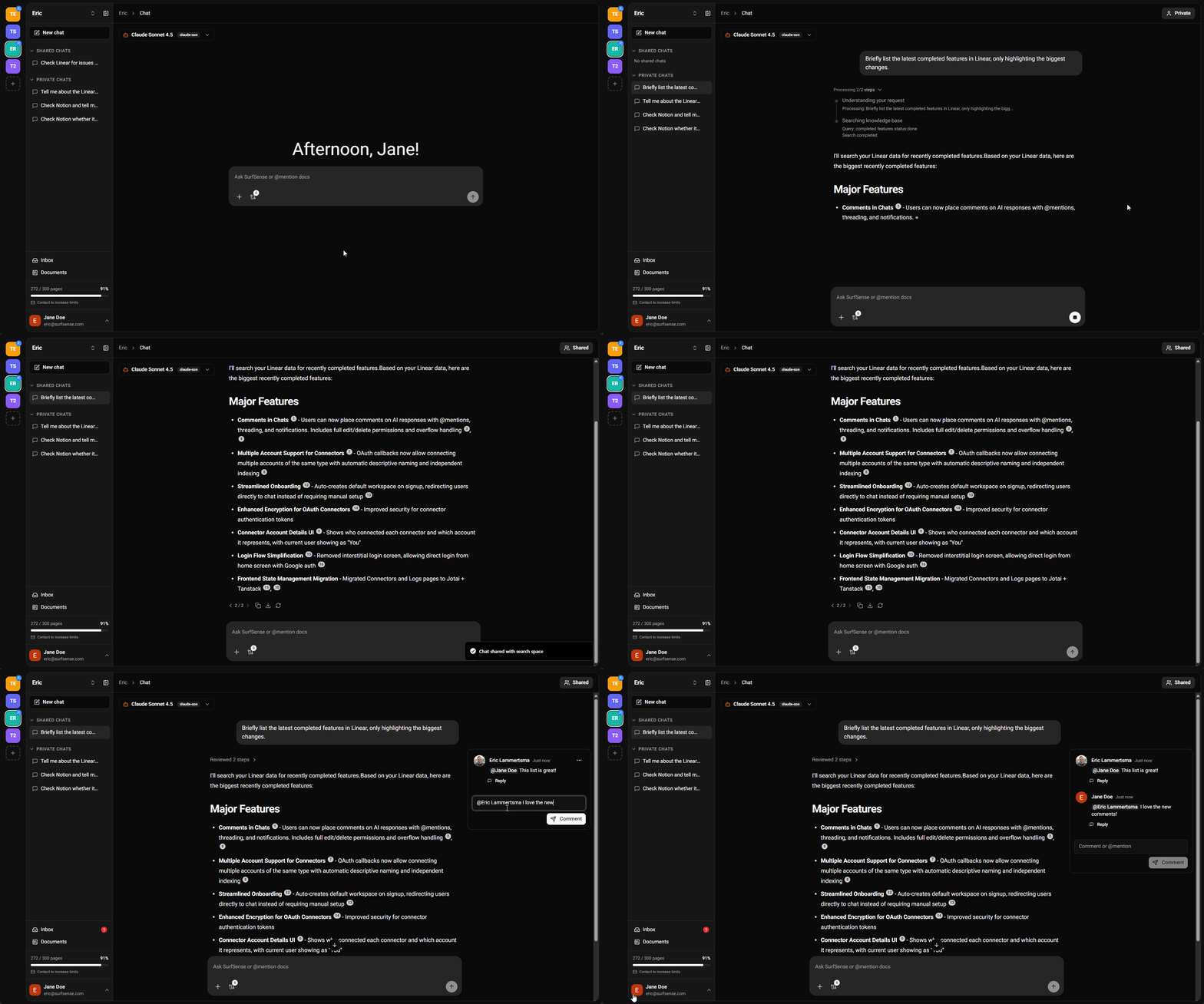
This release brings major improvements to collaboration and user experience. We've completely redesigned the main interface to be chat-first, introduced real-time notifications and live collaboration features, and added a powerful commenting system with @mentions. These changes make Business Aql faster, more intuitive, and better for team collaboration.
Major UX/UI Overhaul
New Chat-First Interface
- Dashboard Removed: Users now land directly in a chat for faster access
- Redesigned Search Spaces: Moved to a left column with color-coded icons and hover tooltips
- Collapsible Sidebar: New sidebar design with collapsible sections for private and group chats
- Streamlined Settings: Accessible through intuitive dropdown menus
- Mobile-Responsive Design: Better experience on all devices
- Single-Click Google Login: Replaces the old two-step process
Real-Time Collaboration Features
Live Shared Chats
- Multi-User Collaboration: Multiple users can now collaborate in the same chat in real-time
- Status Indicators: See when the AI is responding to another team member
- Instant Sync: Changes sync instantly across all open tabs and users
Chat Comments with @Mentions
- Comment on AI Responses: Discuss responses directly with your team
- Single-Level Threading: Reply to comments with organized threads
- @Mentions: Tag teammates to get their attention
- Real-Time Notifications: Receive instant alerts when someone mentions you
Real-Time Notifications
- Instant Updates: Replaced slow polling with instant notifications using ElectricSQL + PGlite
- New Inbox: See connector indexing, document processing, and system events immediately
- Cross-Tab Sync: Syncs across all your browser tabs in real-time
Connector Enhancements
OAuth Migration for Better Security
- New OAuth Connectors: Migrated Linear, Slack, Notion, Discord, Confluence, and Jira to OAuth-based authentication
- Circleback Integration: Connect your AI meeting notes from Circleback
- Future Date Indexing: Index future dates for calendar-based connectors to plan ahead
- 5-Minute Periodic Syncing: Near-real-time updates option
- Real-Time UI Updates: See connector indexing progress without page refreshes
This release transforms Business Aql into a truly collaborative, real-time platform with a redesigned interface that puts chat front and center. The addition of comments, @mentions, and live collaboration features makes it easier than ever for teams to work together without leaving the app.
Business Aql is your AI-powered federated search solution, connecting all your knowledge sources in one place.
Business Aql v0.0.11 - Connectors And More Connectors
What's New in v0.0.11
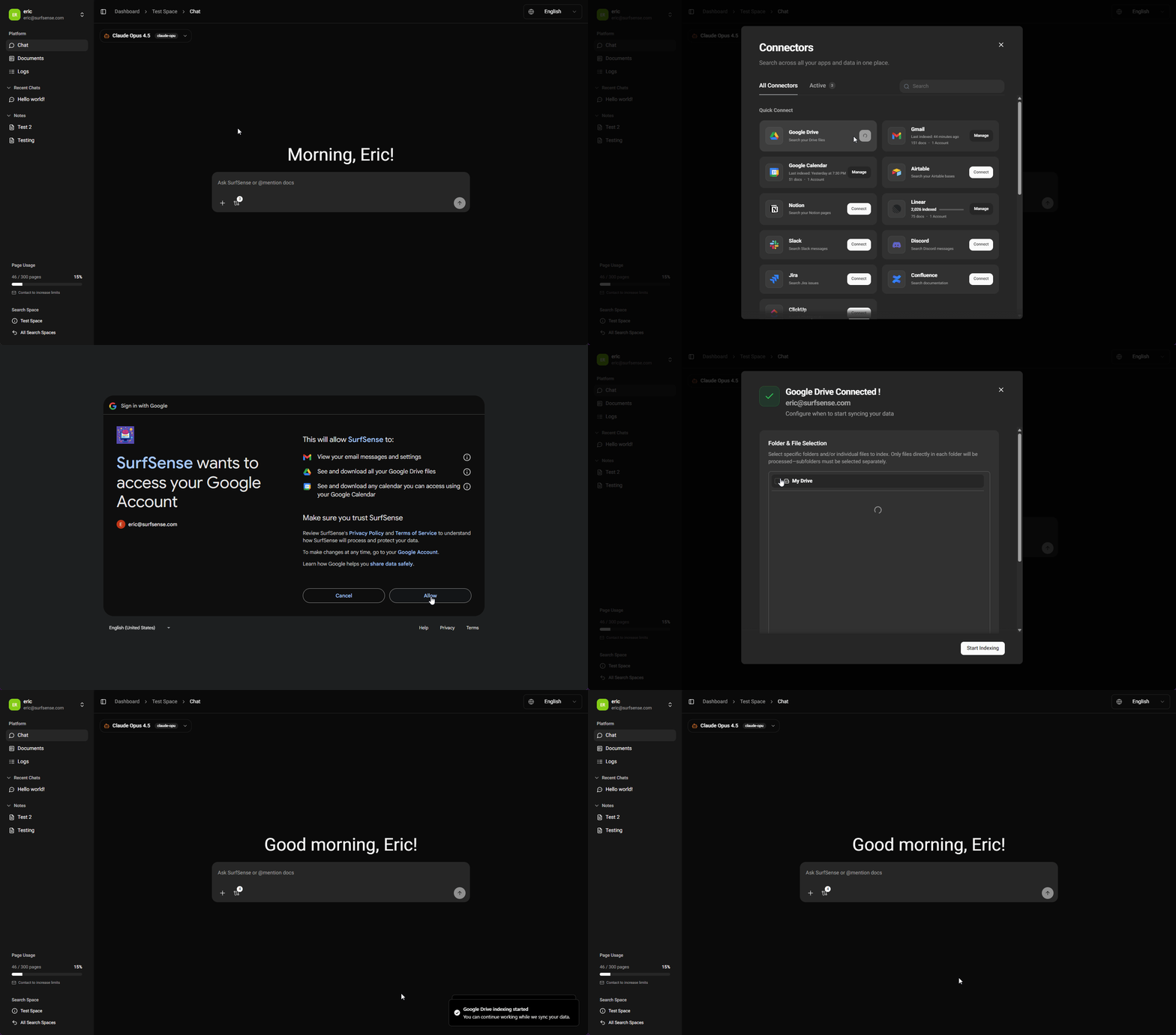
This release focuses on connectivity and ease of use for your enterprise search software. We've begun a comprehensive UX overhaul, streamlining how you connect your data sources, alongside a fully responsive mobile interface that lets you access Business Aql's AI enterprise search capabilities from anywhere.
New Features
- Mobile-Ready Interface: A fully responsive UI implementation allows you to search and collaborate seamlessly from your mobile device, bringing enterprise search solutions to your pocket.
- Streamlined Connector Management: We've simplified the connector setup and management pages as part of a larger, ongoing UX overhaul for a smoother experience.
- Google Drive Integration: Added a dedicated connector for Google Drive, featuring granular file selection to index only what you need for precise enterprise search.
- Circleback Support: Introducing a new connector for Circleback to integrate your meeting notes and insights into your unified knowledge base.
- Simplified OAuth Authentication: All supported connectors have been migrated to OAuth, making setup faster and more secure across your enterprise search software stack.
- Multi-Account Support: Connect multiple accounts for the same service (e.g., Personal and Work Google Drives) to unify all your data sources in one AI-powered search hub.
Business Aql is an open-source AI enterprise search solution that connects all your knowledge sources, from Google Drive to Slack to meeting notes, in one intelligent, federated search platform. Whether you're looking for enterprise search software for your team or a personal knowledge assistant, Business Aql delivers powerful enterprise search solutions with the flexibility of self-hosting.
🚀 Connect more, search smarter!
Business Aql v0.0.9 - Introducing the Agentic Architecture
What's New in v0.0.9
This release introduces the Business Aql Agent, a shift from pre-determined workflows (DAG) to dynamic, LLM-driven decision making.
- Smarter Source Selection: Intelligently searches all connected sources based on your query, not just the ones you specify
- Temporal Queries: Understands time-based questions like "Slack messages from last week"
- Reasoning & Refinement: Iteratively refines answers for better accuracy
- Better Prompt Handling: Knows when to respond in chat vs generate a podcast
- Faster Indexing: Improved speed when syncing connected sources
- MCP Compatibility: Extensible architecture supporting Model Context Protocol servers
Business Aql is an AI-powered federated search solution that connects all your knowledge sources in one place.
🎄 Merry Christmas from the Business Aql team!
 Business Aql
Business Aql